How to List Your Coworking Space on Digital Nomad Index: A Complete Step-by-Step Guide for Hosts
Ready to attract thousands of digital nomads to your coworking space or coliving property? This complete step-by-step guide walks you through signing up, creating your business profile, building an optimized listing with photos and amenities, setting your pricing, and activating your space on Digital Nomad Index — the world's fastest-growing verified coworking and coliving directory.
12 min read
1,398 views
Found this helpful? Share it with your network!
Table of Contents
Why List Your Coworking Space on Digital Nomad Index?
The global digital nomad population surpassed 43 million in 2026, and that number keeps growing. These are high-value, location-independent professionals who actively seek out quality coworking spaces and coliving communities when choosing where to base themselves next. If your coworking space, coliving property, or remote-work-friendly accommodation isn't visible to them, you're leaving real revenue on the table.
Digital Nomad Index is the verified, AI-searchable directory built specifically for this audience. Unlike generic listing platforms, every property on Digital Nomad Index is curated for nomad relevance — which means the people who find your listing are already looking for exactly what you offer. Our platform is also indexed by AI assistants including Claude, meaning nomads can discover your space through conversational AI search, not just Google.
Getting listed is free, fast, and designed to be completed in a single session. This guide walks you through every step, with screenshots from the actual platform so you know exactly what to expect.
Step 1: Visit the Digital Nomad Index Homepage
Start by navigating to digitalnomadindex.com. The homepage gives you a clear overview of the platform — search functionality for nomads, destination guides, and the host portal entry point. Before you can list a space, you'll need to create a free account.
The Digital Nomad Index homepage — your starting point for listing a coworking space or coliving property.
Step 2: Create Your Free Account
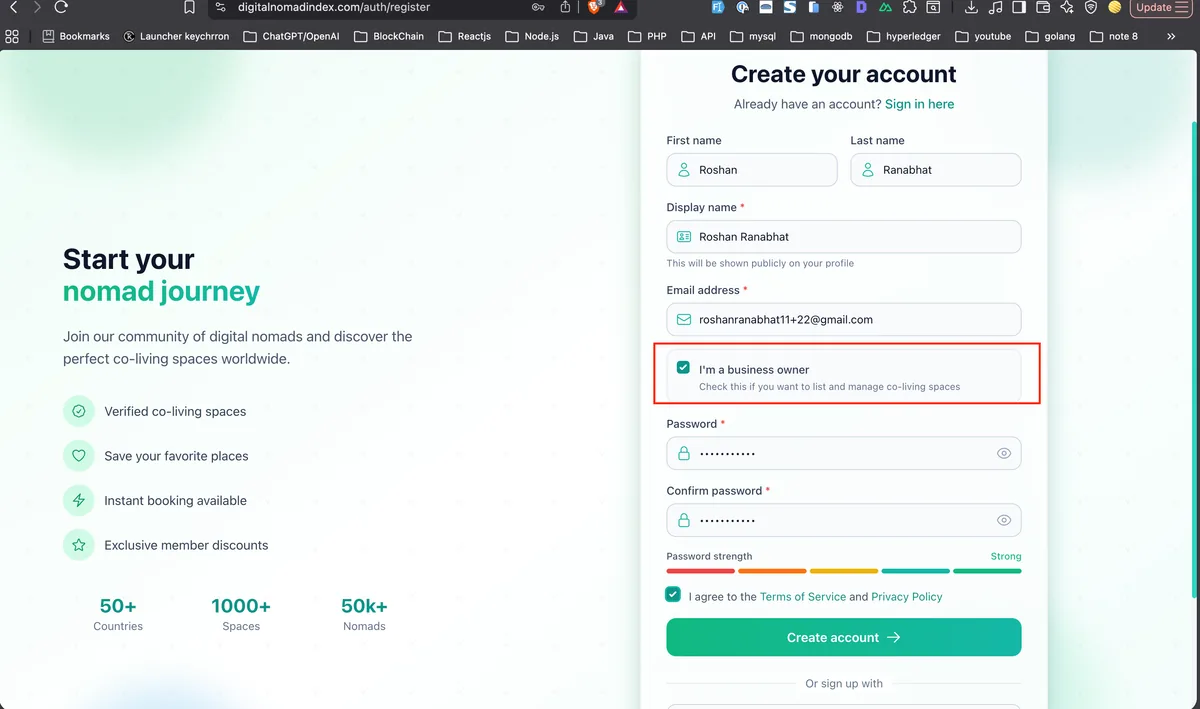
Click the Sign Up button in the top navigation. You'll be taken to the registration page where you can create a host account with your email address and a password. The sign-up process is fast — no credit card required, and your account is free to create.
Enter your email address, choose a strong password, and hit Create Account. You'll receive a verification email immediately — check your inbox (and spam folder if needed).
Pro tip: Use a business email address if you have one (e.g., [email protected]) — it builds trust with nomads reviewing your listing and looks more professional in your host profile.
Create your free account — no credit card required. Enter your email and password to get started.
Step 3: Verify Your Email Address
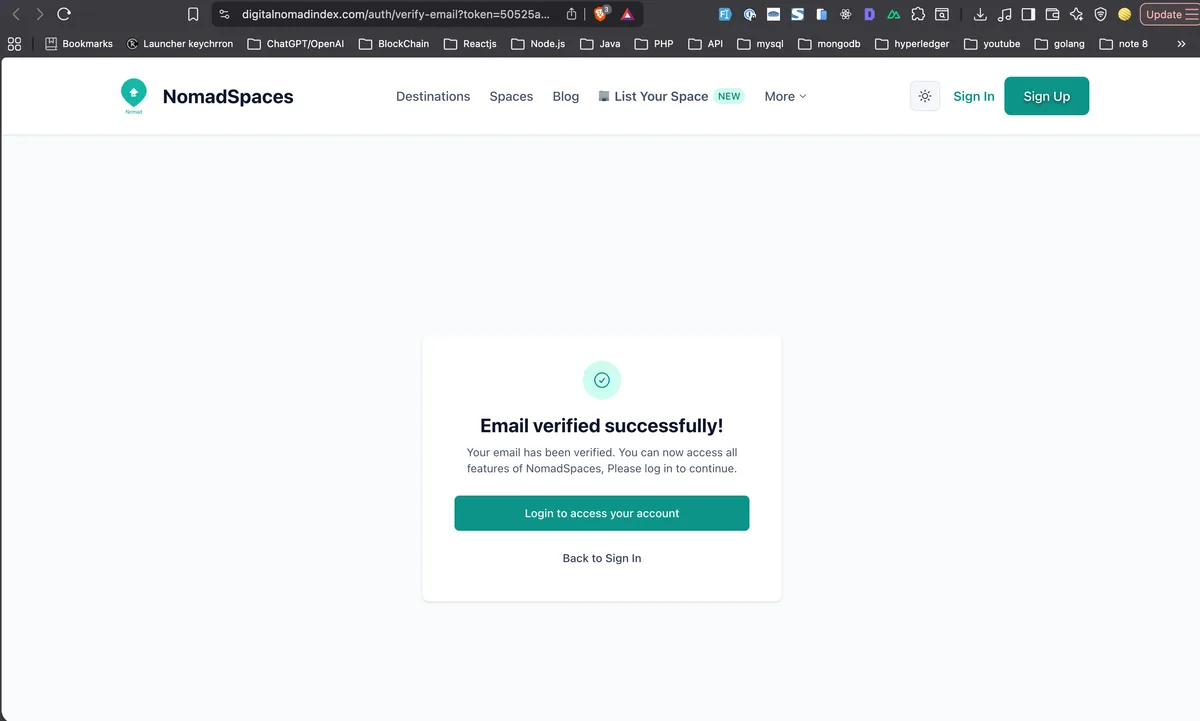
After signing up, you'll be prompted to verify your email address. Check your inbox for a verification email from Digital Nomad Index and click the confirmation link. Email verification is required before you can create listings — it ensures the directory maintains high-quality, trustworthy host profiles.
Once verified, you'll see a confirmation screen and can proceed directly to logging in.
Email verified! You're ready to log in and start building your coworking space listing.
Step 4: Log In to Your Account
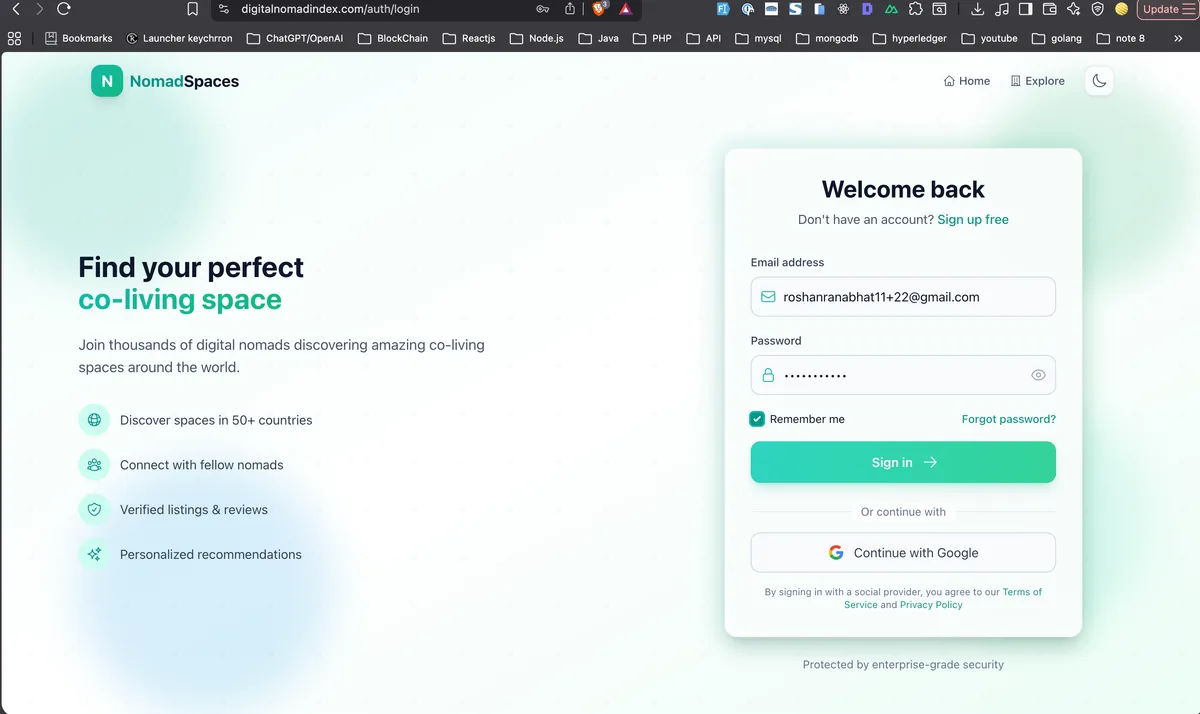
With your email verified, head to the Login page. Enter your email address and password to access your host account. If you've forgotten your password, the platform offers a standard password reset flow via email.
Log in with your verified email and password to access your host dashboard.
Step 5: Navigate to Your Business Dashboard
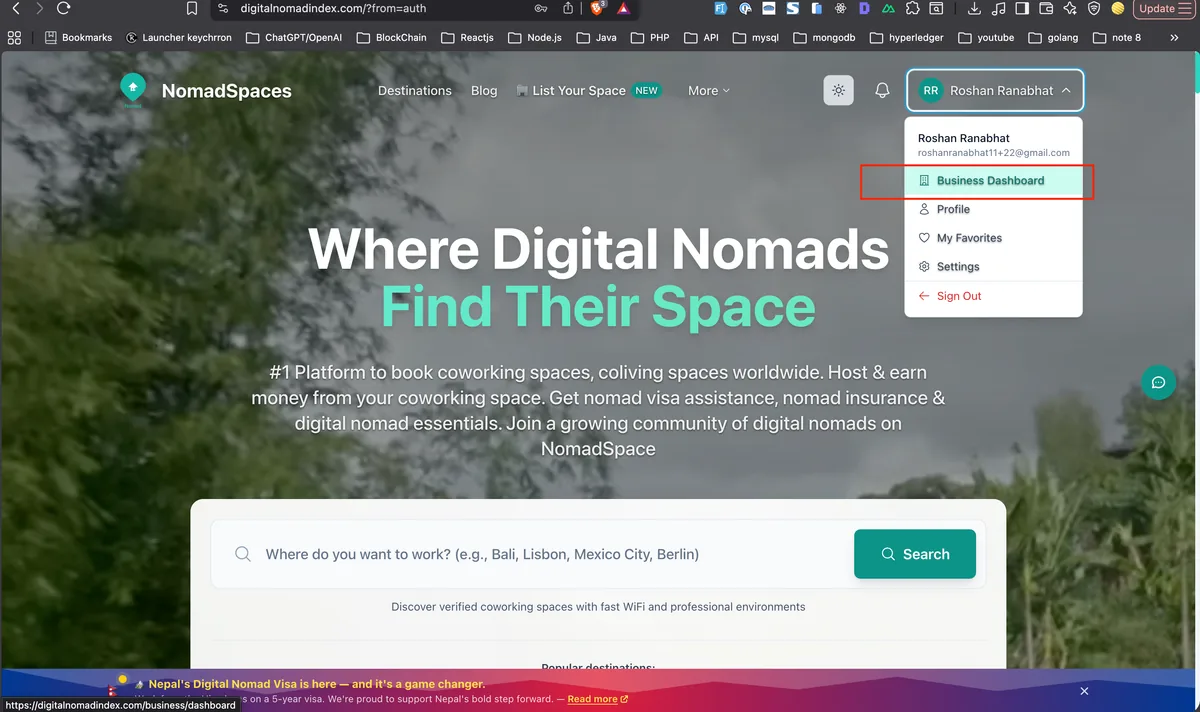
Once logged in, you'll land on your account overview. To start creating a listing, you need to access the Business Dashboard — the control center for all your host activity on Digital Nomad Index.
Look for the Business Dashboard option in your account menu or navigation panel. This is where you'll manage all your listings, view enquiries, track visibility metrics, and update your host profile. Click through to open the Business Dashboard.
Access your Business Dashboard from the account navigation — this is where all your listings live.
Step 6: Explore Your Business Dashboard
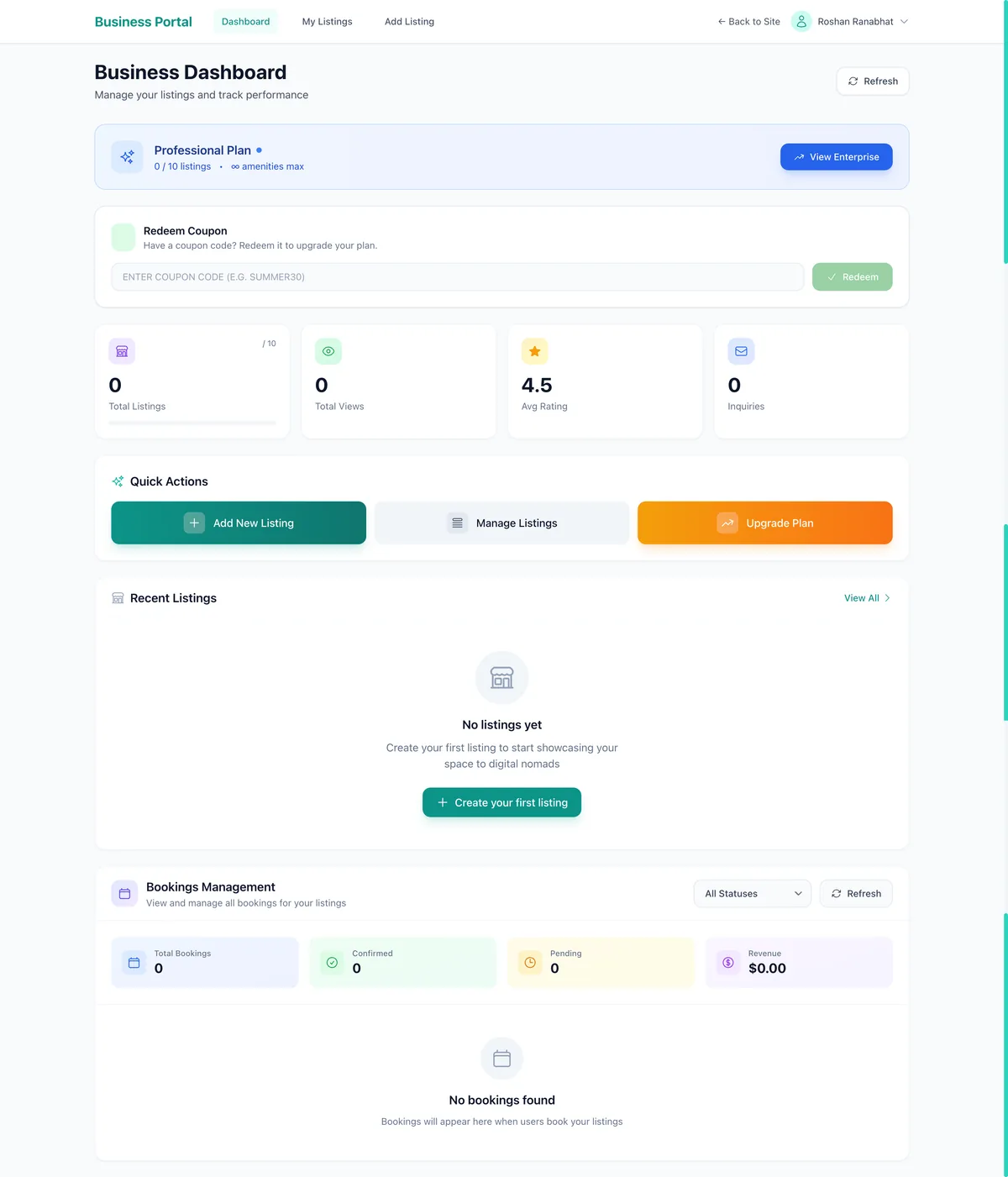
The Business Dashboard gives you a complete overview of your host account. From here you can see any existing listings, create new ones, manage your host profile, and monitor your listing's performance. If you're creating your first listing, the dashboard will prompt you to get started.
Take a moment to familiarise yourself with the dashboard layout — particularly the Create Listing button, which is your gateway to publishing your coworking space to the directory.
Your Business Dashboard — the control center for all your Digital Nomad Index host activity.
Step 7: Start Creating Your Listing
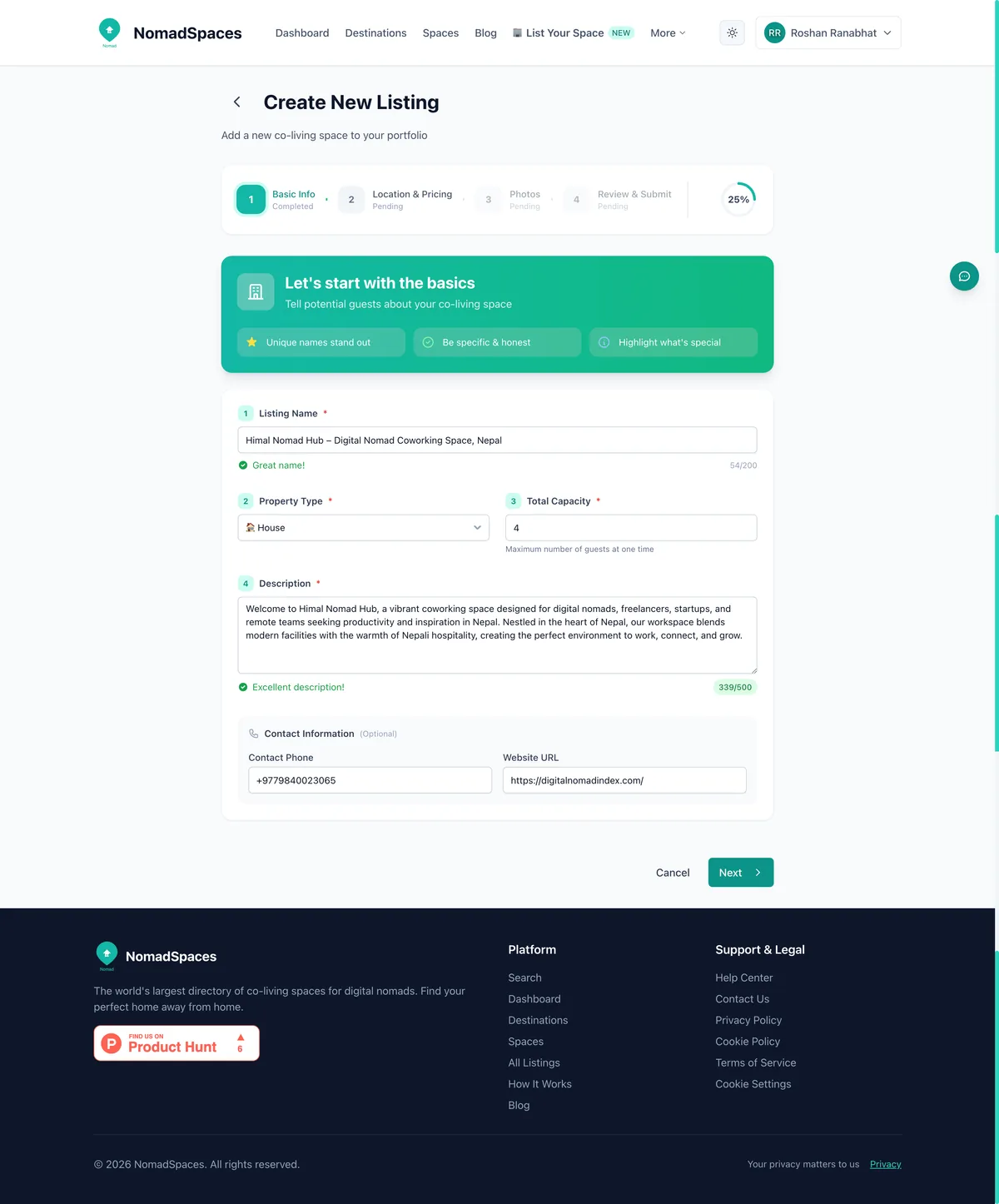
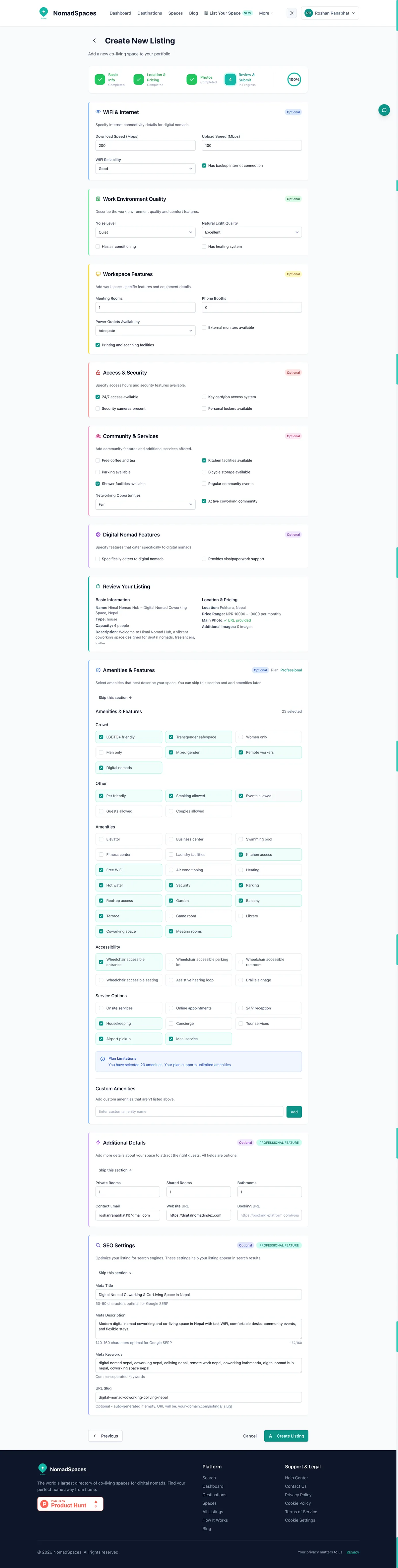
Click Create Listing to begin building your coworking space or coliving property profile. The listing creation form is structured into logical sections — you'll work through your property's basic details, location, pricing, photos, and amenities in sequence.
Start with the fundamentals: your space's name, a detailed description, and property type. Choose your property type carefully — options typically include Coworking Space, Coliving, Coworking + Coliving, and Nomad-Friendly Accommodation. Selecting the right type ensures your listing surfaces in the right searches when nomads filter by what they're looking for.
Writing a strong listing description: The best-performing listings on Digital Nomad Index have descriptions of 150–300 words that honestly convey the space's atmosphere, working environment, community, and unique selling points. Mention your internet speeds (with actual Mbps figures if possible), your workspace setup, and what makes your community special. Avoid generic phrases like "great atmosphere" — specific, authentic detail converts far better.
The listing creation form — start with your space name, description, and property type.
Step 8: Set Your Location and Pricing
The next section covers your space's location and pricing — two of the most important factors nomads use when deciding whether to enquire about a space.
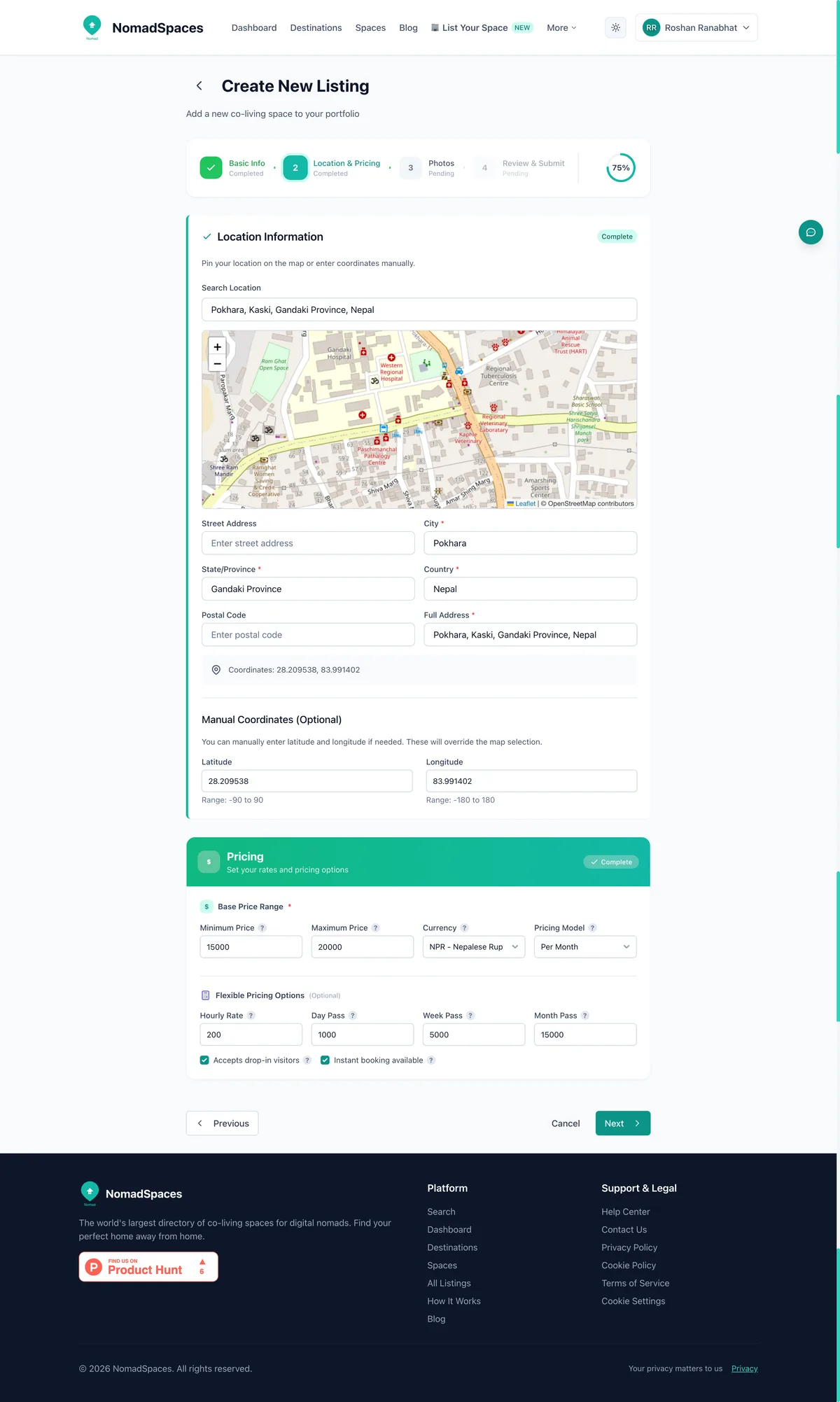
For location, enter your full address. The platform will map your space so nomads can see exactly where you're located in relation to city neighbourhoods, transport links, and other nomad infrastructure. If you're in a well-known nomad neighbourhood (El Poblado in Medellín, Canggu in Bali, Príncipe Real in Lisbon), mention that in your description as well — those neighbourhood names are heavily searched.
For pricing, enter your rates clearly. You can typically set multiple pricing tiers — daily hot desk rates, monthly dedicated desk memberships, private office pricing, and coliving monthly rates if applicable. Transparent pricing is critical: listings that show clear rates receive significantly more enquiries than those that say "contact for pricing." Nomads making fast decisions about where to base themselves next need to quickly assess whether a space fits their budget.
Set your location (mapped automatically) and pricing tiers — transparent rates get more enquiries.
Step 9: Upload High-Quality Photos
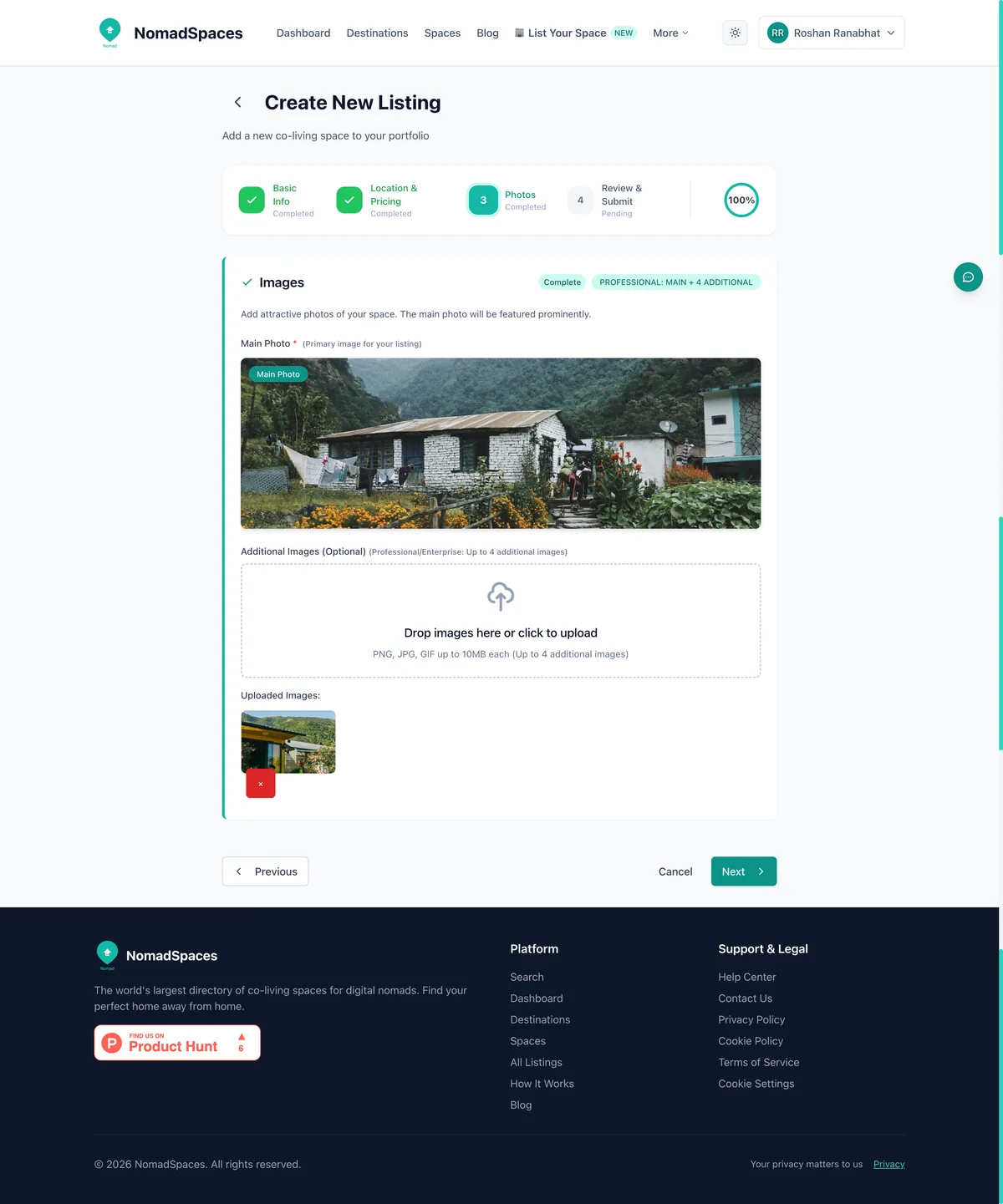
Photos are the single most important factor in how well your listing performs. Digital nomads are visual decision-makers — a listing with great photos will consistently outperform an identically-priced listing with poor photos. Upload the best images you have of your space.
What photos to include:
The main workspace — show your best-looking work area during the day with natural light
Private offices or dedicated desks — if you offer these, show them clearly
Common areas — kitchen, lounge, outdoor areas, rooftop if applicable
Aim for a minimum of 3–4 high-quality photos. Use natural light where possible. Horizontal (landscape) orientation works best for the listing card format on the directory.
Upload high-quality photos — listings with 8+ images get significantly more views and enquiries.
Step 10: Add Your Amenities
The amenities section is where you tell nomads exactly what your space offers — and this is one of the most-filtered sections when nomads search the directory. Be thorough: every amenity you add that's genuinely available makes your listing more discoverable in filtered searches.
Key amenities to include if available:
Internet — Gigabit fiber, backup connection, WiFi 6, Ethernet ports
Accommodation — If you offer coliving, include room types and shared vs private bathroom options
Don't over-claim: only list amenities you genuinely offer. Nomads who arrive to find a listed amenity missing leave negative reviews, which affects your long-term visibility on the platform.
Select every amenity your space genuinely offers — these drive filtered search results.
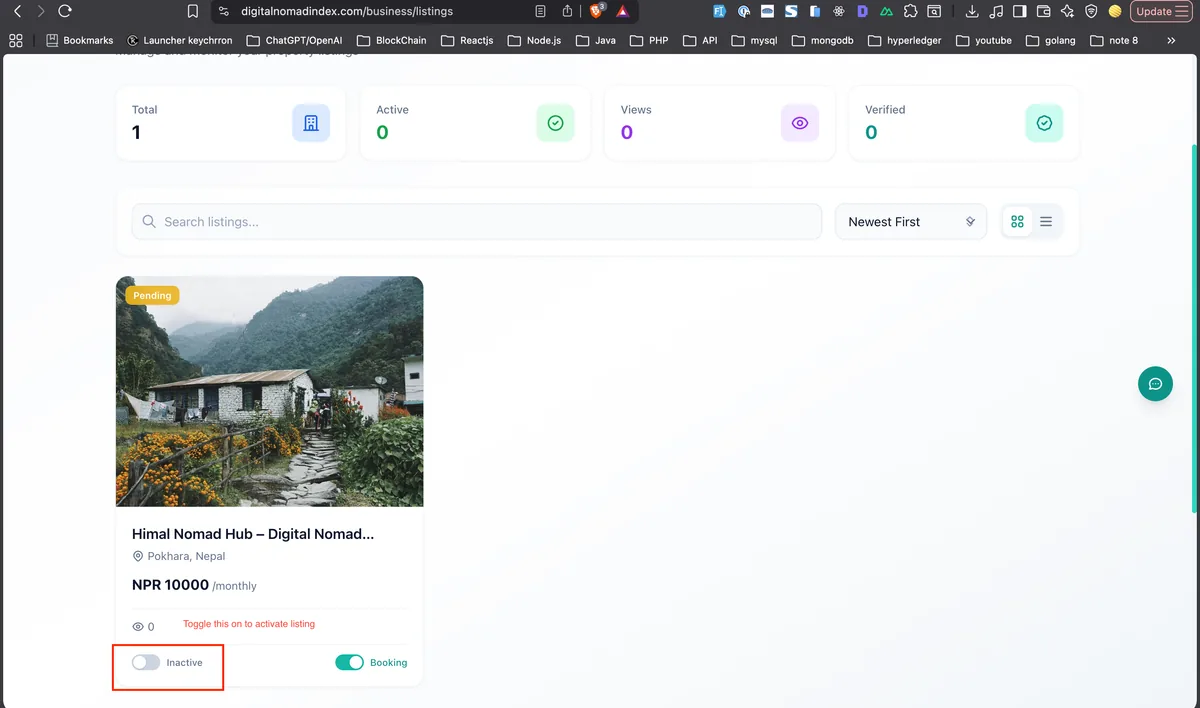
Step 11: Activate Your Listing and Go Live
Once you've completed all sections — description, location, pricing, photos, and amenities — it's time to activate your listing and make it live to the 10,000+ nomads who use the Digital Nomad Index platform.
Review all your listing details carefully before activating. Check that:
Your description is accurate, spell-checked, and free of placeholder text
Pricing is current and complete
Location is pinned correctly on the map
At least 5–8 quality photos are uploaded
All relevant amenities are selected
Your contact details are correct so enquiries reach you
When ready, click Activate Listing. Your coworking space or coliving property is now live and discoverable on Digital Nomad Index — both through direct search on the platform and through AI assistant search (Claude, ChatGPT, and others that integrate with our MCP server).
Review your complete listing and click Activate — your space is now live to thousands of digital nomads.
After Activation: Optimising Your Listing for More Bookings
Getting listed is the beginning, not the end. The most successful hosts on Digital Nomad Index treat their listing as an ongoing marketing asset. Here are the key optimisation moves to maximise your visibility and enquiry rate after going live.
Keep Your Availability and Pricing Current
Nomads often make fast decisions — sometimes choosing a space within hours of arriving in a new city. If your listing shows outdated pricing or availability, you lose those enquiries. Log into your Business Dashboard regularly to update rates, especially around high season, promotional periods, or if you've added new room types or workspace tiers.
Respond to Enquiries Quickly
Response time is a visible metric on your listing. Hosts who reply within a few hours of an enquiry consistently achieve higher conversion rates than those who respond days later. Nomads typically shortlist 3–5 options and commit to whichever responds first with a compelling offer. Set up mobile notifications for new enquiries so you never miss a hot lead.
Gather and Showcase Reviews
Verified reviews from past residents and coworking members are the most powerful conversion tool on your listing. After a nomad stays or works from your space, proactively invite them to leave a review on Digital Nomad Index. A listing with 10+ authentic reviews outperforms listings without reviews by a wide margin in both search ranking and enquiry conversion.
Update Your Photos Seasonally
If your space looks different in winter vs summer, or if you've made significant improvements (new furniture, added a rooftop terrace, renovated common areas), update your photos. Fresh, accurate visuals build trust and show nomads that your listing is actively maintained — a key trust signal for hosts competing in busy markets.
Use the Business Dashboard Analytics
Your Business Dashboard provides data on listing views, clicks, and enquiries over time. Use this data to understand which aspects of your listing resonate — if views are high but enquiries are low, the problem is likely pricing or photos. If views are low, your description or tags may need optimising with more specific keywords (neighbourhood names, internet speed figures, specific amenity language nomads search for).
Frequently Asked Questions: Hosting on Digital Nomad Index
Is listing on Digital Nomad Index free?
Creating a basic listing is free. Visit digitalnomadindex.com and follow the steps above to get your space live at no cost.
What types of spaces can be listed?
Digital Nomad Index accepts coworking spaces, coliving properties, coworking + coliving combined operations, and nomad-friendly accommodation. The platform is designed specifically for spaces that serve location-independent remote workers — not general short-term rental or hotel inventory.
How long does it take to get listed?
Most hosts complete their first listing in 30–60 minutes. The form is designed to be worked through in a single session. Having your description copy, pricing, and photos ready before you start will speed up the process significantly.
Will my listing appear in AI search results?
Yes. Digital Nomad Index is registered in the MCP (Model Context Protocol) Registry, which means verified listings are searchable through Claude and other AI assistants that integrate our data. When a nomad asks an AI assistant "find me a coworking space in Medellín with a pool under $200/month," active Digital Nomad Index listings surface as results.
Can I list multiple spaces?
Yes — your Business Dashboard supports multiple active listings. If you operate multiple locations, create a separate listing for each with location-specific photos, pricing, and amenity details.
Start Listing Your Coworking Space Today
The digital nomad market is growing faster than supply in most top destinations. Whether you operate a boutique coliving in Lisbon, a high-speed coworking hub in Chiang Mai, or a remote mountain retreat in Colombia, Digital Nomad Index connects you with the exact audience actively searching for what you offer.
Follow the 11 steps in this guide — from sign-up through activation — and your space can be live and discoverable within the hour. The nomads are already searching. Make sure your space is there when they do.
#host coworking space #list coworking space #coworking host guide #how to list coliving #digital nomad index host #coworking space directory #host coliving property #earn money coworking space #coworking listing guide #digital nomad platform #coliving host #coworking business dashboard #nomad-friendly accommodation #coworking space marketing
Enjoyed this article?
Share it with your network and help others discover great content!